
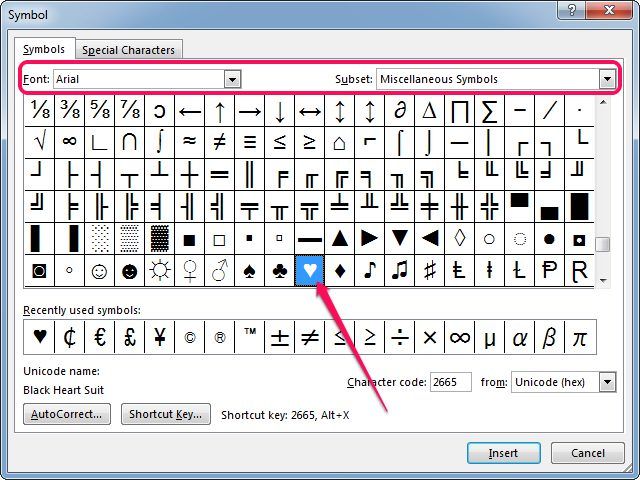
Digital marketers and user interface designers constantly use visual elements to increase engagement. Whether you are structuring social media captions or designing a promotional website slider, adding heart symbols directly into your copy draws immediate attention. Pausing your work to execute a heart symbol copy paste from a search engine breaks your focus. Standard mechanical keyboards lack a dedicated key for this popular icon. Learning the exact Numpad Alt codes, keyboard shortcuts, and Unicode values allows you to type these characters instantly across any application.
Typing Heart Symbols on Windows and macOS
Windows operating systems rely on numeric keypad inputs for special characters. To use the alt code for heart insertion, ensure Num Lock is active. Press and hold the Alt key, type the exact number sequence on the numeric keypad, and release the Alt key. If you are learning how to type a heart on keyboard layouts without a physical Numpad, pressing the Windows Key and Period (.) keys simultaneously opens the native symbol picker.
Apple computers utilize the Character Viewer for emoji and typographic symbol insertion. The fastest mac shortcut for heart symbol access requires pressing Command, Control, and Spacebar. This combination opens a searchable menu directly above your active text cursor.
| Operating System | Input Method | Key Combination or Code |
| Windows OS | Numpad Alt Code | Alt + 3 |
| macOS | Keyboard Shortcut | Cmd + Ctrl + Space (Search “Heart”) |
| Ubuntu Linux | Unicode Hex Input | Ctrl + Shift + U, type 2665, Enter |
| Windows OS without Numpad | Symbol Menu | Windows Key + Period (.) |
| iOS and Android | Touch Keyboard | Emoji Keyboard (Tap the smiley face) |
Advanced Heart Symbol Copy Paste and Unicode Variations
The standard black heart suits basic text formatting, but digital design often requires hollow outlines, heavy graphic variations, or specific colored emojis. Software like Adobe Illustrator or Figma relies on precise glyph insertion. When keyboard shortcuts fail or your word processor blocks numeric inputs, utilizing a direct heart symbol copy paste method from the character map below guarantees accurate formatting. You can copy any of these variations directly into your active project.
| Symbol Name | Heart Symbol | Windows Alt Code | Unicode Hex |
| Black Heart Suit | ♥ | Alt + 3 | U+2665 |
| White Heart Suit (Hollow) | ♡ | Alt + 9825 | U+2661 |
| Heavy Black Heart | ❤ | Alt + 10084 | U+2764 |
| Rotated Heavy Black Heart Bullet | ❥ | Alt + 10085 | U+2765 |
| Floral Heart | ❦ | Alt + 10086 | U+2766 |
| Heavy Moustoched Heart | ❧ | No Alt Code | U+2767 |
Implementing Heart Icons in Code and Web Design
Front-end web developers and content managers cannot rely exclusively on keyboard inputs when structuring HTML documents. Web browsers require specific character encoding to render heart symbols correctly across different mobile operating systems and screen resolutions.
When placing a heart character inside a meta description, an e-commerce product title, or a user interface button, developers utilize specific HTML entities or CSS properties. This practice ensures the characters display flawlessly without causing validation errors or breaking the website layout.
| Software or Environment | Implementation Method | Syntax or Entity |
| Word Processors | Unicode Hex Conversion | Type 2665 and press Alt + X |
| HTML Document | HTML Entity Name | ♥ |
| HTML Document | HTML Entity Number | ♥ |
| CSS Stylesheet | CSS Content Property | \2665 |
| JavaScript | Unicode Escape | \u2665 |
Frequently Asked Questions
How do I type a heart symbol on a laptop without a Numpad?
Press the Windows Key and the Period (.) key at the same time. This action opens the Windows emoji and symbol picker. Navigate to the symbols tab to find and insert various heart shapes directly into your document or game chat.
Why does my alt code for heart show up as a blank box?
The current font you are using in your word processor does not support that specific Unicode character. Highlight the blank box and change your text font to a universal option like Arial, Segoe UI Symbol, or Times New Roman to render the mark correctly.
What is the fastest way to add a red heart emoji in a desktop browser?
On a Windows computer, right-click inside any text field and select “Emoji” from the context menu, or press Windows + Period (.). On a Mac, press Command + Control + Spacebar. Both methods grant instant access to the standard red heart emoji (❤️) found within the system fonts like Segoe UI Emoji or Apple Color Emoji.