
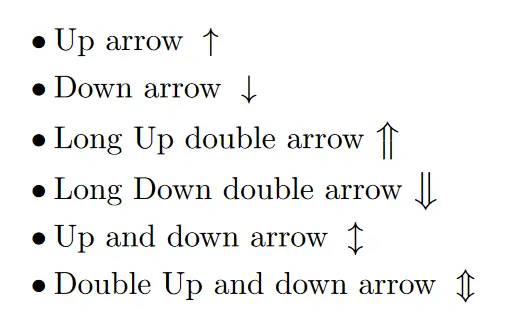
Hardware keyboards feature dedicated left, right, up, and down arrow keys located in the navigation cluster or integrated into the Numpad. These keys control cursor placement, software viewports, and character movement. Operating systems and applications also assign secondary functions to these keys when combined with modifiers like Ctrl, Alt, Shift, and Command. Memorizing system-level shortcuts and specific Numpad Alt codes allows users to insert typographic arrows directly into documents, execute application macros, and modify default control schemes.
Typing Arrow Symbols via Alt Codes
Windows OS permits users to generate Unicode arrow characters using the numeric keypad. Users must activate Num Lock, hold the Alt key, type a specific numeric sequence on the Numpad, and release the Alt key to output the symbol. Laptops lacking a physical Numpad require the Windows Key + Period (.) shortcut to open the symbol picker.
macOS users access these symbols by pressing Command + Control + Space to open the Character Viewer, then typing “arrow” into the search bar. Ubuntu Linux environments utilize Unicode hex input by pressing Ctrl + Shift + U, typing the exact hex code, and pressing Enter.
The standard directional arrows occupy Alt codes 24 through 27. Extended Unicode libraries contain heavy arrows, double arrows, curved variants, and filled geometric arrowheads used for user interface design and technical documentation.
| Symbol Name | Arrow Symbol | Windows Alt Code | Unicode Hex |
| Upwards Arrow | ↑ | Alt + 24 | U+2191 |
| Downwards Arrow | ↓ | Alt + 25 | U+2193 |
| Rightwards Arrow | → | Alt + 26 | U+2192 |
| Leftwards Arrow | ← | Alt + 27 | U+2190 |
| Up Down Arrow | ↕ | Alt + 18 | U+2195 |
| Left Right Arrow | ↔ | Alt + 29 | U+2194 |
| Up-Pointing Triangle | ▲ | Alt + 30 | U+25B2 |
| Down-Pointing Triangle | ▼ | Alt + 31 | U+25BC |
| Right-Pointing Triangle | ► | Alt + 16 | U+25BA |
| Left-Pointing Triangle | ◄ | Alt + 17 | U+25C4 |
| Rightwards Double Arrow | ⇒ | Alt + 8658 | U+21D2 |
| Left Right Double Arrow | ⇔ | Alt + 8660 | U+21D4 |
| Up Down Double Arrow | ⇕ | Alt + 8597 | U+21D5 |
| Downwards Arrow with Corner Left | ↵ | Alt + 8629 | U+21B5 |
| Heavy Black Rightwards Arrow | ➡ | Alt + 10145 | U+27A1 |
Code Editors and Text Navigation
Software engineers rely on arrow key modifiers for rapid multi-line text selection. Highlighting code blocks via keyboard inputs removes the need for mouse dragging.
In Visual Studio Code (VSCode), users highlight syntax before executing global formatting commands. Before triggering a vscode format document shortcut (Shift + Alt + F on Windows, Shift + Option + F on macOS), developers hold Ctrl + Shift + Up/Down Arrow (Windows) or Option + Shift + Up/Down Arrow (macOS) to isolate specific JSON or Python syntax. Pressing Alt + Up/Down Arrow moves the selected line of code vertically through the script without executing copy and paste commands.
| Action | Windows OS Shortcut | macOS Shortcut |
| Jump cursor one word left/right | Ctrl + Left/Right Arrow | Option + Left/Right Arrow |
| Select text word by word | Ctrl + Shift + Left/Right Arrow | Option + Shift + Left/Right Arrow |
| Move line of code up/down | Alt + Up/Down Arrow | Option + Up/Down Arrow |
| Highlight entire line from cursor | Shift + Home/End | Shift + Cmd + Left/Right Arrow |
Spreadsheet Data Manipulation
Microsoft Excel and Google Sheets rely heavily on directional inputs for data manipulation. Tapping an arrow key shifts the active cell boundary. Holding Shift + Arrow expands the cell selection area across rows and columns.
After executing an excel shortcut to merge cells (Alt + H + M + M), pressing the Down Arrow immediately positions the active cell indicator in the adjacent row below for continued numeric data entry. Pressing Ctrl + Arrow Key moves the cursor to the exact edge of the current data region, stopping at the first empty cell.
| Spreadsheet Action | Excel Shortcut | Google Sheets Shortcut |
| Jump to edge of data region | Ctrl + Arrow Key | Ctrl + Arrow Key |
| Expand selection to data edge | Ctrl + Shift + Arrow Key | Ctrl + Shift + Arrow Key |
| Move to next worksheet | Ctrl + Page Down | Alt + Down Arrow |
| Scroll application window | Scroll Lock + Arrow Key | Not Supported natively |
3D Software Viewports and Video Editing
Video editors using Adobe Premiere Pro 2024 map timeline playback directly to keyboard arrows. Tapping the Left Arrow or Right Arrow steps playback backward or forward by exactly one frame across the timeline. Holding the Shift key (Shift + Left/Right Arrow) increments the playback step to exactly five frames for rapid B-roll trimming and playhead positioning.
In Blender 3D, Numpad arrows dictate orthographic and perspective viewing angles. Operating blender camera controls requires utilizing Numpad 4 and Numpad 6 to orbit the viewport horizontally around a 3D mesh. Numpad 8 and Numpad 2 orbit the view vertically. Numpad 1, 3, and 7 snap the camera directly to front, right, and top orthographic views respectively.
PC Gaming Keybinds and Mechanics
While WASD dominates modern PC gaming, directional arrow keys provide an alternative control scheme for left-handed players, simulation enthusiasts, or gamers utilizing 60% layout mechanical keyboards. Rebinding standard keys demands an understanding of adjacent keyboard zones like the Numpad, Navigation cluster, and modifier keys to maintain rapid physical access to secondary actions.
Players configuring how to sprint in gta 5 pc while using a directional arrow layout map the sprint action (defaulted to Left Shift) to the Right Shift or Right Ctrl key. This specific placement aligns the sprint function with the pinky finger of the right hand, replicating the ergonomic reach of standard WASD setups.
For competitive shooter games, establishing the fortnite best keybinds for beginners with an arrow layout involves grouping building and combat actions tightly around the primary movement keys.
| Game Action | Recommended Arrow Setup Keybind | Standard WASD Default |
| Move Forward | Up Arrow | W |
| Move Backward | Down Arrow | S |
| Strafe Left | Left Arrow | A |
| Strafe Right | Right Arrow | D |
| Jump | Right Shift or Numpad 0 | Spacebar |
| Reload | Right Ctrl | R |
| Crouch | Right Alt or Delete | C or Left Ctrl |
| Sprint | Enter or Numpad 1 | Left Shift |
| Next Weapon | Mouse Scroll Wheel Up | Mouse Scroll Wheel Up |
Frequently Asked Questions
How do I type a specific Unicode arrow if the Alt code does not work?
If Numpad Alt codes fail, type the exact Unicode hexadecimal value (like 21D2 for a double right arrow) in Microsoft Word and immediately press Alt + X to convert the raw text into the symbol.
Why are my arrow keys scrolling the entire spreadsheet view instead of moving my active cell?
The Scroll Lock function is currently active on the hardware keyboard. Press the ScrLk key once to disable the lock and restore standard cell navigation in Microsoft Excel or Google Sheets.
Can I bind gaming mouse buttons to act as directional arrow keys?
Peripheral management software like Logitech G HUB, Corsair iCUE, or Razer Synapse permits assigning Up, Down, Left, or Right arrow keystrokes directly to Mouse Button 4 or Mouse Button 5 for macro execution in games or productivity software.